Home About Me Freebies My Classroom My Products TeachersPayTeachers Facebook Pinterest BlogLovin Instagram Image Map
Showing posts with label APPS. Show all posts

March 23, 2016

Prep Positions {APP Review}


Smarty Ears has done it again! They have created another app which was a huge hit with my students. This app addresses prepositions with a fun circus theme.


Initially you will need to set up a profile for each player. The set up is very easy since it is voice guided.


Once you have entered the student, you will need to adjust the level by sliding the elephant up and down. There are 15 levels to choose from targeting different prepositions, which are shown to the right of each level. They did a fantastic job of including a wide range of prepositions and grouping them in terms of difficulty. After choosing the level you are ready to begin. 


Your student(s) will need to drag the correct answer into the sentence. The app reads the sentences, but not the answers. However, if your student clicks on each word it will say the word for them. Once they choose the correct word they are given visual and auditory reinforcement. 


Then, they are prompted to record themselves saying the completed sentence with the correct word. 


After so many correct responses they will earn a ball which they can use in the game after they have completed a certain number of trials.




The object of the game is to shoot the ball the farthest. 


Another great feature is you can adjust the settings from inside the game by clicking on the settings button in the top left corner. This allows you to turn the audio off/on, change the background to a neutral color, increase/decrease the frequency for prompts and turn them on/off. 


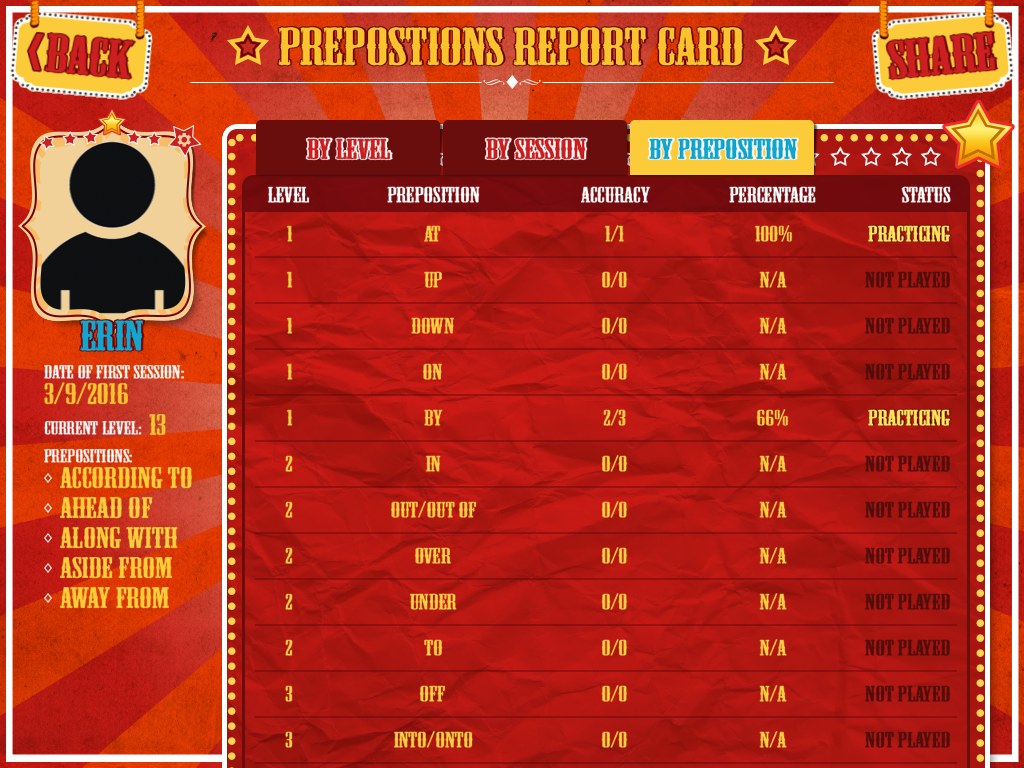
This app also tracks each students progress and has it broken down by level, session, or by preposition. This breakdown is so helpful when trying to identify what specifically needs to be targeted with a students. The information can be emailed or imported into the Therapy Report Center.




If you have students who need to work on using prepositions, this is an excellent app to use. I used it with my 2nd, 3rd, and 5th graders, but would use it with students in middle school as well. It is simple, easy to use, motivating, and gives students tons of practices. 

If you are interested in purchasing this app, it is available on iTunes for 19.99 at the time of this review. For more information about this app you can visit Smarty Ears.

**A copy of this app was provided by Smarty Ears. No other compensation was provided. The opinions expressed are all mine.** 

February 3, 2016

Learning Verbs {App Review}

Last week I received a message from a new app developer, Language Concepts. They asked me to check out their new app Learning Verbs. Of course I jumped at the offer, since I love finding new materials to use with my students.


Learning Verbs  is designed to target receptive learning of verbs. There are 22 real images to choose from with the option to add your own images.


After selecting which verbs you are going to target, you are able to choose how they will be displayed for your students.  You can have a field of one, two, three, or four verbs presented at a time. You are also able to turn the text, audio, and feedback on and off on the home screen and during the activities. 


While the app is designed for receptively learning verbs it works great for expressively labeling them. The audio is not automatic, so I had my students label the pictured actions before pushing the audio button to identify the correct verb. If my students chose the correct verb the others would disappear and it would bring up a new set of pictures. When my students chose the incorrect verb a loud voice would say "choose again". I ended up turning off the feedback since the voice was startling and there was no verbal reinforcement for correct answers. 


Overall I think this app was perfect for teaching my students to identify verbs. I liked that they used real images. I also like that I can choose how I want them displayed and change the display while playing the app, that made it easy to individualize for each student. And I didn't have to mess with a bunch of cards. I found this app to be a great progress monitoring tool for leaning to identify verbs and labeling them (if the audio is turned off). I used it mostly my preschool students. Since I used it mostly with my preschool students I would have liked for there to be more positive reinforcement for correct responses and to keep my students engaged. This app does not have any built in data collection which is always nice to have, but wasn't necessary. I was able to easily take data one each student.

You can purchase Learning Verbs for $2.99 in the iTunes store. You can find other information about this app and its developers by visiting Language Concepts. 

*Please note: This app was provided by the developer for review but the opinions here are all mine. No other compensation was provided.